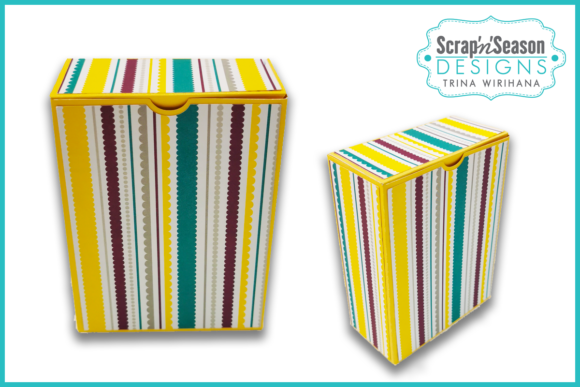
3D Box - Rectangle
When you are looking for the perfect way to present a small gift, party favor, or handmade trinket, the presentation is just as important as the item inside. This is where the 3D Box - Rectangle becomes an essential tool in your crafting arsenal. It offers a clean, professional look that elevates simple items into thoughtful presents. Whether you are preparing for a wedding, a birthday party, or simply want to add a personal touch to a package for a friend, this digital template provides the structural integrity and aesthetic appeal needed to make your project stand out.
However, jumping straight into cutting without understanding the nuances of digital die-cutting files can lead to frustration. Many creators assume that downloading a file guarantees a perfect result, but the quality of the final product depends heavily on how you prepare your materials and set up your machine. By avoiding common pitfalls, you can ensure that every box you assemble looks crisp, sturdy, and ready to impress.
Understanding the Digital File Structure
The core of this project is the SVG digital download zipped file. It is crucial to understand what you are actually purchasing before you begin. The file typically includes two main components: the base piece designed to form the box structure, and decorative mat pieces intended to add visual depth and style. When you unzip the file, you will find vector graphics that are compatible with popular cutting machines such as Cricut, Silhouette, and Scan n cut.
A frequent mistake beginners make is ignoring the difference between cut lines and score lines. In this specific design, the orange lines represent score marks. These are not meant to be cut through; rather, they indicate where the paper should be folded to create the three-dimensional shape. If you send the entire file to your cutter without adjusting these settings, you risk slicing through the fold lines, which will cause the box to collapse or look misshapen. Always open the file in your chosen software and verify that the scoring tool is assigned correctly to the orange paths, while the blade is reserved for the perimeter cuts.
Material Selection Matters More Than You Think
One of the most overlooked aspects of creating 3D boxes is the choice of cardstock. While it might seem tempting to use any leftover paper from a previous project, the weight and texture of your material directly impact the structural integrity of the 3D Box - Rectangle. Thin printer paper will likely buckle under its own weight or fail to hold a sharp crease, resulting in a sloppy appearance. On the other hand, extremely thick cardboard may be difficult to score cleanly, leading to jagged edges.
For the best results, aim for a medium-weight cardstock, typically between 80lb and 110lb cover weight. This range provides enough stiffness to hold the box’s shape while remaining flexible enough to fold neatly along the scored lines. Patterned papers are excellent for the decorative mats, allowing you to match themes for holidays or events. However, ensure that the pattern does not interfere with the alignment of the folds. A busy pattern can sometimes hide minor errors in assembly, but it can also make it harder to see if your corners are aligned properly during the gluing process.
Machine Settings and Calibration
Even with the right paper, improper machine settings can ruin a project. Different brands of cardstock have varying friction levels, which affects how the blade interacts with the material. Before committing to expensive paper, always run a test cut. This step is non-negotiable for achieving professional results.
If you are using a Cricut, check your material setting carefully. For standard cardstock, the "Cardstock" setting is usually appropriate, but you may need to adjust the pressure or number of passes depending on the thickness. With Silhouette machines, paying attention to the blade depth is critical. A blade that is too deep will cut through multiple layers of paper stacked on your mat, wasting material and potentially damaging your blade tip. Conversely, a blade that is too shallow will leave uncut sections, forcing you to manually tear the paper, which creates rough, uneven edges.
Another subtle detail is the orientation of the grain. If you are working with pre-scored or textured paper, the direction in which you load it into the machine can affect how easily it feeds through. Experimenting with loading the paper vertically versus horizontally can sometimes reduce jamming and improve cut precision.
Assembly Techniques for a Professional Finish
Once the pieces are cut, the assembly phase requires patience. Rushing this stage often leads to glue seeping out of the seams or corners that do not sit flush. Use a bone folder or the back of a butter knife to burnish the score lines before folding. This action compresses the fibers of the paper, creating a sharper, cleaner fold that holds its shape better over time.
When applying adhesive, less is more. Using too much glue can warp the delicate decorative mats or cause the box to swell at the seams. A thin line of liquid glue or double-sided tape works best. Take your time aligning the sides; even a millimeter of misalignment can be visible once the box is filled. If you are making multiple boxes for a party, consider creating a jig or a simple guide to help keep the corners square during assembly.
Evaluating Value and Usage
Why choose a digital template over buying pre-made boxes? The primary advantage is customization. With the 3D Box - Rectangle, you control the size, color, and pattern. You can create hundreds of unique variations without the high cost of bulk manufacturing. This makes it ideal for entrepreneurs selling handmade goods or bloggers looking to enhance their content with visually appealing props.
Furthermore, because it is a digital download, you have immediate access to the file. There is no shipping wait time, and you can print and cut as many copies as you need. This efficiency is particularly beneficial for educators teaching craft classes or marketers creating promotional materials. You can update your designs instantly by changing the digital artwork, ensuring your packaging always feels fresh and relevant.
In conclusion, mastering the 3D Box - Rectangle is about more than just pressing a button on your cutting machine. It involves selecting the right materials, calibrating your equipment, and assembling with care. By paying attention to these details, you avoid the common frustrations of crooked folds and weak structures. Instead, you produce elegant, durable boxes that reflect your skill and attention to detail. Happy Crafting!